
New Agent Notification Email
Paragon Release 26.14 — Refreshed auto-notification email experience
Paragon has refreshed the look and feel of agent-facing auto-notification emails. Instead of sending a separate, fully-detailed email for every listing update, agents now receive a single consolidated Contacts Saved Search Digest that summarizes new listing activity across all of their contacts’ saved searches.
Why This Changed: Reducing Individualized Alerts
Previously, agents with large contact lists and many active saved searches could receive hundreds of individual notification emails as listings updated throughout the day — one email per contact, per saved search, per update. This created significant email volume, made it difficult to see what actually mattered, and in some cases caused email providers to truncate or cut off messages entirely.
The new digest-style notification consolidates all of that activity into one email per digest cycle, showing only the contacts and saved searches with genuinely new listing activity.
What’s New
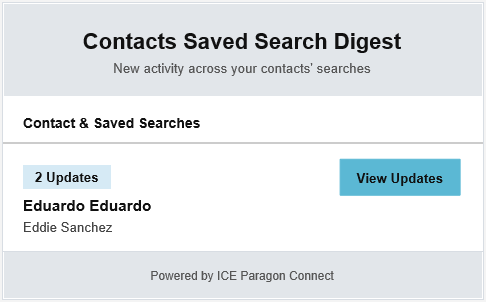
| ✓ | Digest format: Listing update activity is consolidated into a single, easy-to-review summary instead of one email per update. |
| ✓ | No listing preview content: Full listing details have been removed from the email body, keeping messages shorter and preventing truncation by email providers. |
| ✓ | Relevant contacts only: Only contacts with updated listing activity, and the specific saved searches that generated it, are shown. |
| ✓ | View Updates button: Each contact includes a dedicated button that jumps directly into Paragon Connect to review the related listing updates. |
Example: What Agents Will See
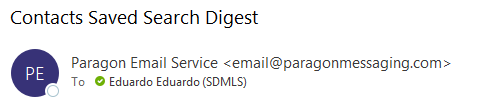
Sender and subject line as it appears in an agent’s inbox:
Body of the digest email, showing consolidated updates and the View Updates button:
Frequently Asked Questions
Q: Will I still get an email for every listing update?
No. Updates are now batched into a single digest per cycle rather than sent individually, which is why the volume of notification emails has dropped.
Q: Why don’t I see listing photos or details in the email anymore?
Listing preview content was intentionally removed to keep the email short and to prevent email providers from truncating longer messages. Full listing detail is available with one click via the View Updates button.
Q: Where does the View Updates button take me?
Directly into Paragon Connect, to the listing updates associated with that contact’s saved search.
Q: Can I turn the digest format off and go back to individual emails?
This is a system-wide change to the notification template rolled out in Paragon Release 26.14 and applies to all agent accounts.
Source: Paragon Release Notes 26.14, Section 2.2 — New Agent Notification Email
Need Local Assistance |
If you have any problems or questions please call SDMLS Support (858) 373-4010 or email - Support@sdmls.com |
Was this article helpful?
That’s Great!
Thank you for your feedback
Sorry! We couldn't be helpful
Thank you for your feedback
Feedback sent
We appreciate your effort and will try to fix the article